Uncertainty is a reality for every organization. Economic shifts, funding changes, and unexpected events can all impact your financial stability. That's why scenario planning is essential—it helps you prepare for different possibilities and make informed decisions before challenges arise.
This guide walks through the Scenario Budget Planning Template developed by Propel Nonprofits. This comprehensive tool helps nonprofit organizations model different income and expense scenarios, understand their impact, and document programmatic implications.
Scenario budget planning is the process of creating multiple budget versions based on different assumptions about the future. Rather than hoping for the best, you actively explore what would happen if funding decreased, expenses increased, or program models changed. This prepares you to respond quickly and strategically when circumstances shift.
This comprehensive file consists of 13 interconnected worksheets:
The template uses a color-coded system to guide you: gold cells for customizing categories, light blue for entering your organization's data, and dark blue for automatic calculations.
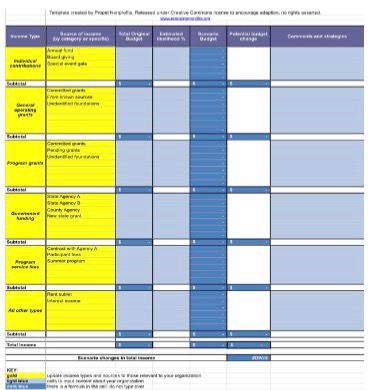
Caption: Modify the gold cells in each Income Scenario sheet to match your organization's actual income sources.
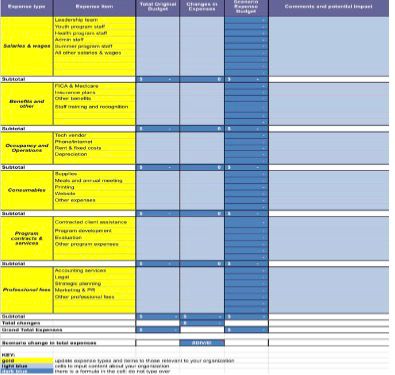
Caption: Update the gold cells in each Expense Scenario sheet with your organization's expense categories.
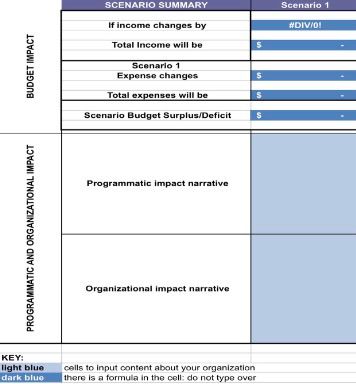
Caption: Each Impact sheet automatically calculates surplus or deficit. Add narrative about programmatic and organizational implications.
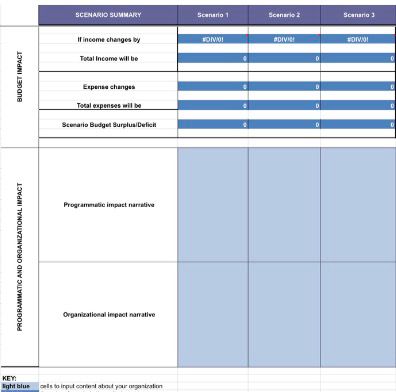
Caption: The master summary shows all three scenarios side by side with totals and impact narratives for easy comparison.
The template uses a clear color system to guide you:
How many scenarios should I create?
The template includes three, which is a manageable number. You might create a conservative scenario, an optimistic scenario, and a major disruption scenario.
Can I change the formulas?
Yes, but save a blank copy first. The formulas are designed to work with the structure, but you can modify them if needed.
What if my income sources are different from the examples?
Absolutely customize them. The gold cells are meant to be changed. Add rows as needed—the formulas will adjust.
How do I handle in-kind contributions or non-cash income?
Include them if they're material to your budget. You may want to add a separate section or note them in comments.
Should I include reserves in my scenarios?
The template focuses on operating income and expenses. You can factor reserves into your narrative or modify the template to include reserve drawdowns.
What if my scenario shows a deficit?
That's valuable information. It tells you that under those assumptions, you'd need to make further adjustments, use reserves, or find additional income. The earlier you know this, the more time you have to prepare.
That's valuable information. It tells you that under those assumptions, you'd need to make further adjustments, use reserves, or find additional income. The earlier you know this, the more time you have to prepare.

Scenario planning transforms uncertainty from a source of anxiety into a tool for strategic thinking. By exploring multiple possibilities, you identify risks before they materialize, spot opportunities you might otherwise miss, and build organizational agility.
This template from Propel Nonprofits gives you a structured way to model different income and expense scenarios, understand their financial impact, and document what they would mean for your programs and mission.
Download the template, customize it for your organization, and start exploring what the future might hold. The time invested in scenario planning pays dividends when change happens—and change always happens.
Download your template:
Download Excel Template